/Logo_ISO-Gruppe_RGB_negativ_alles.png?width=125&height=75&name=Logo_ISO-Gruppe_RGB_negativ_alles.png)

Starting in September 2026, Atlassian will gradually introduce additional configuration limits for Jira Cloud. The new limits apply to field options, security levels, permissions, releases, workflows, components, and priorities, among other things.
For companies with large Jira instances, this means that existing configurations will remain intact, but new elements may be blocked once a limit is reached. Jira administrators should therefore review their usage early on and clean up any configurations that are no longer needed.
Comparing Limits and Guardrails
What is a limit?
A limit is a software-enforced upper bound for a specific type of data or configuration.
Once the limit is reached, Jira prevents any administrative action that would add further elements of that type. Existing configurations remain available and continue to function.
What is a guardrail?
A guardrail is a recommended guideline for a manageable and high-performing Jira configuration. Guardrails are not technically enforced.
Exceeding a guardrail therefore does not automatically block further actions. However, it can increase complexity and—depending on queries, data volume, access patterns, apps, and integrations—negatively impact performance.
Which Jira limits will apply from September 2026 onwards?
Starting in September 2026, Atlassian will begin gradually enforcing the following additional limits. Since the rollout is phased, the exact activation date may vary depending on the entity or Jira instance.
| Configuration | Limit |
|
Field options per field |
20,000 |
|
Security levels for issues per space |
50 |
|
Permission assignments per permission |
50 |
|
Releases or versions per space |
15,000 |
|
Workflows per workflow schema |
150 |
|
statuses per workflow |
200 |
|
Jira components per space |
10,000 |
|
Priorities per space |
100 |
These limits apply to the Jira Cloud product family, including Jira, Jira Service Management, and Jira Product Discovery, provided that the respective feature is available in the product.
What Do The Individual Limits Mean?
Field options
A maximum of 20,000 options can be configured per field. Once this limit is reached, administrators cannot create any additional options for that field. Existing options remain available.
Security Levels
A space may contain a maximum of 50 security levels for issues. Existing security levels and issues that use these security levels remain functional.
Permission Assignments
A maximum of 50 assignments are allowed per permission. For example, an assignment can grant a specific right to a user, a group, or a Space role.
Releases and Versions
Once a Space reaches the limit of 15,000 releases, no further releases can be created. Archived releases should not be included when calculating this limit. Existing releases and the associated operations remain available.
Workflows and Statuses
A workflow schema may contain a maximum of 150 workflows. A single workflow may include a maximum of 200 statuses.
Reaching a limit does not affect existing workflows. However, administrators cannot add any further workflows or statuses until the affected configuration has been resolved.
Components
A maximum of 10,000 Jira components is allowed per space. This limit applies to Jira components and not to Compass components.
Priorities
A priority configuration may contain a maximum of 100 priorities for the affected space. Existing priorities and issues that use them will remain intact.
What Guardrails Does Atlassian Recommend?
In addition to the hard limits, Atlassian provides the following recommended guidelines:
|
Data Range |
Recommended Guideline |
|
Issues per site |
30,000,000 |
|
Spaces per site |
30,000 |
|
Space role actors per space |
5,000 |
|
Space roles per user and site |
2,000 |
These values are not strict upper limits. They are intended to keep the data structure of a large Jira instance manageable.
What Happens When a Limit is Reached?
If a configuration is already at or above the limit, Jira will reject any administrative action that would add additional elements. A bulk action will be rejected if it would expand the configuration beyond the allowed limit. Jira does not apply the action partially.
For end users, reaching a limit generally has no immediate impact:
- Existing configurations remain available.
- Jira does not automatically delete, archive, deactivate, or modify existing data.
- Users can continue to create and update issues.
- Administrators can make independent configuration changes.
- Other configurations that are below their respective limits remain unchanged.
- Jira displays a message if an administrative action is rejected due to a limit.
How Can Organizations Prepare Their Jira Instance?
Jira administrators should conduct an assessment before the full rollout of the limits. This is particularly relevant for instances with many projects, complex permission schemes, historically evolved workflows, or numerous Marketplace apps.
1. Review configurations and usage
Check the following in particular:
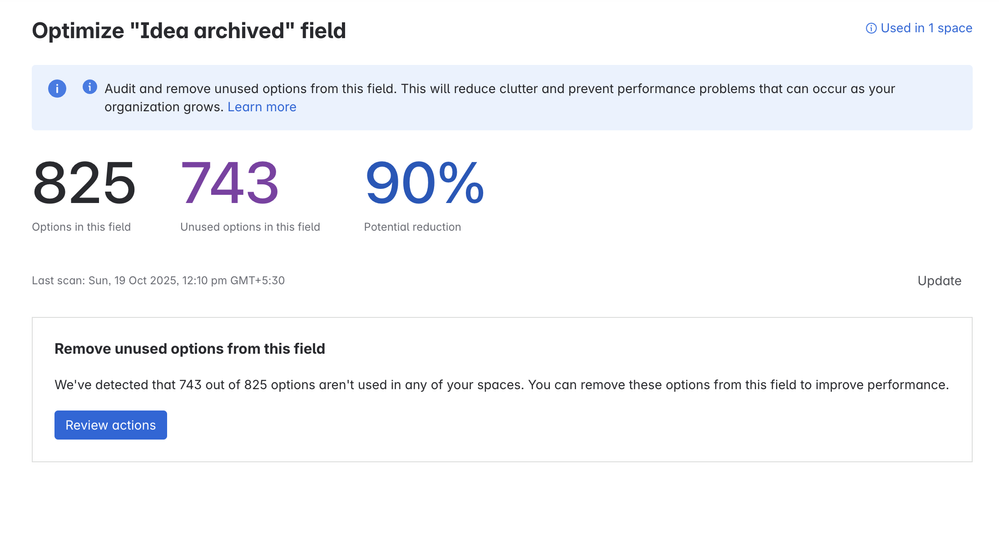
- Field options with many outdated or duplicate entries
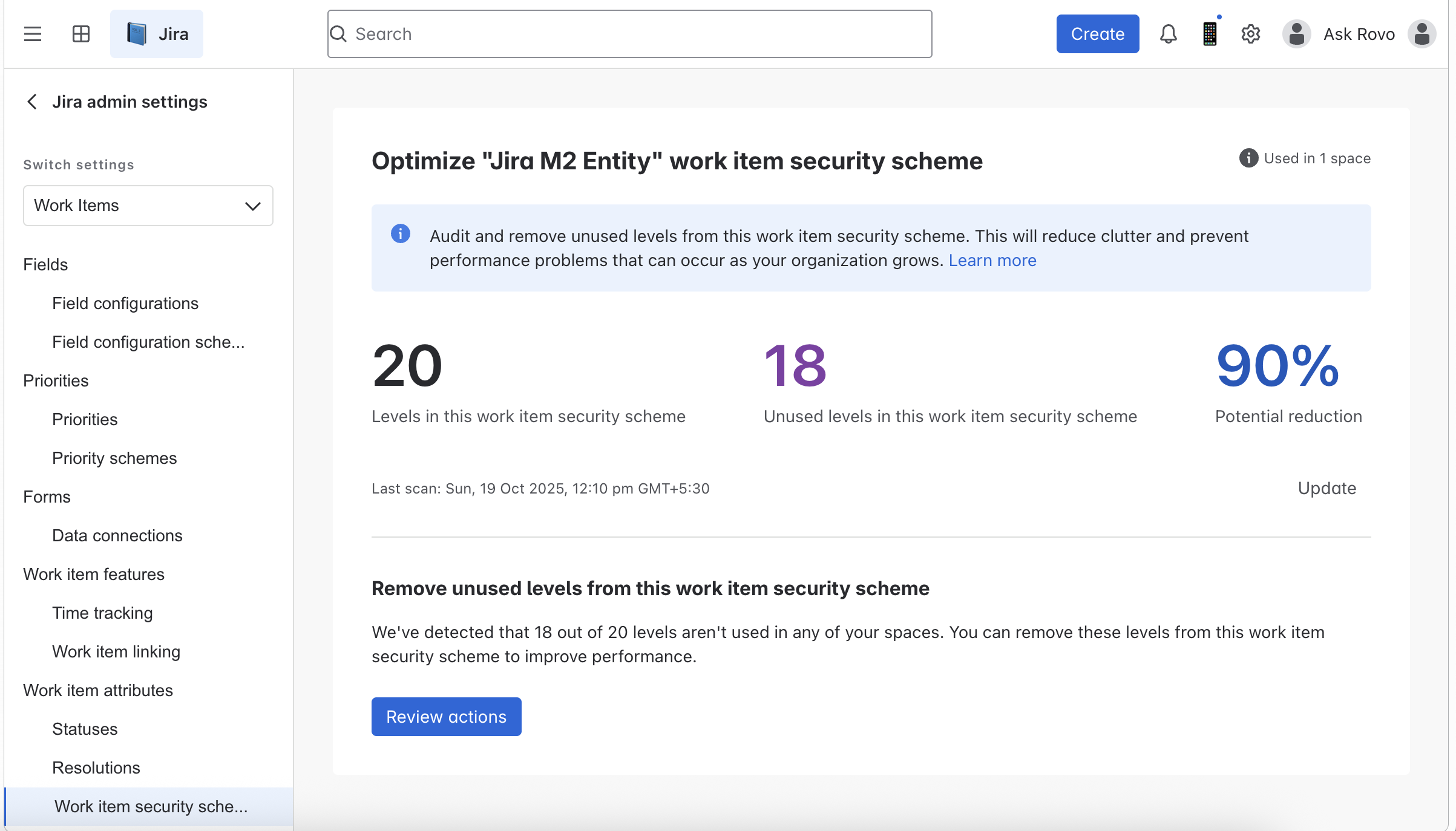
- Security levels that are no longer in use
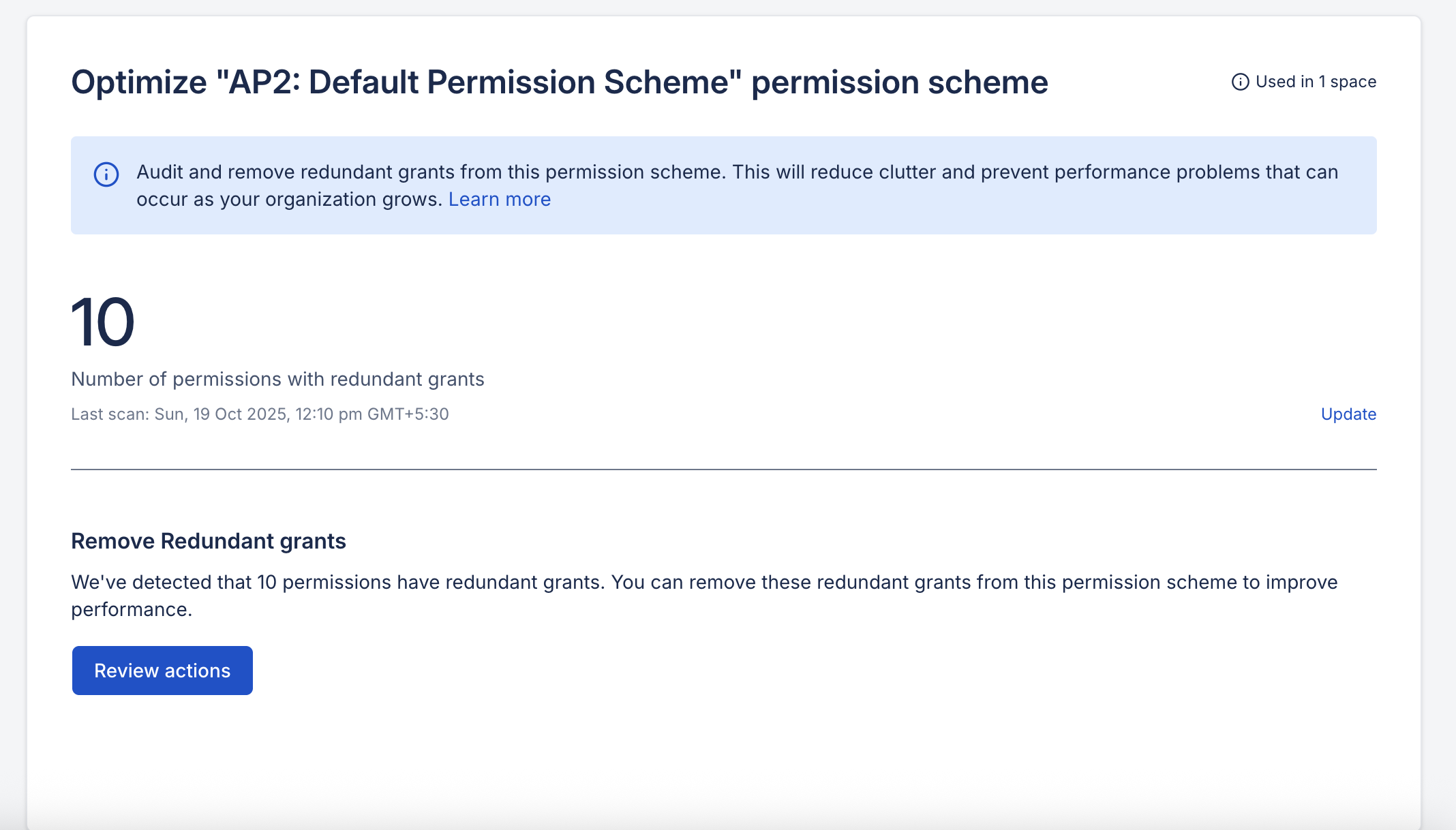
- Redundant permission assignments
- Old or archived releases
- Workflows and workflow statuses that are no longer needed
- Outdated components
- Unused priorities
- Space roles and role members exceeding the recommended guardrails
Examples of how to review your configuration:
Check for and delete unused security levels
2. Clean up unnecessary configurations
Do not remove obsolete elements indiscriminately. Before cleaning up, check whether they are still being used in processes, workflows, filters, automations, reports, or integrations.
It is particularly important to check for dependencies in:
- User-defined fields
- JQL filters
- Automations
- Permission schemes
- Workflow transitions
- External integrations
Examples of unused field options:
Examples of cleaning up permission assignments:
3. Use Site Optimizer
Customers with Enterprise and Premium plans can use Site Optimizer to analyze data usage and identify unused entities. Depending on the configuration, you can, for example, clean up unused field options, security levels, or redundant permission assignments.
Standard customers can check usage in the Jira settings. REST APIs or custom scripts are also suitable for more comprehensive audits.
4. Take a holistic view of performance factors
The new limits are not the only factor affecting the performance of a large Jira instance. Other relevant factors include:
- The scope and complexity of JQL queries
- Configuration of boards and backlogs
- Number and use of custom fields
- Traffic and access patterns
- Automations
- Marketplace and custom apps
- Integrations with other systems
Reducing the configuration may therefore be advisable, even if an instance is still below a hard limit.
Conclusion
The new Jira Cloud limits, effective September 2026, are intended to make large instances more stable, reliable, and scalable. They will not result in existing configurations being automatically deleted or deactivated.
For organizations, the most important action required relates to administrative changes: Once a limit is reached, no further elements of the same category can be added. Conducting an early assessment, cleaning up unused configurations, and regularly monitoring the guardrails will help prevent operational restrictions down the line.
If you need assistance with this, please contact us. We’d be happy to help.